The Ultimate n8n Guide Features, Pricing, Use Cases & Automation Workflows
The Dawn of Flexible Automation
Modern businesses rely heavily on automation, yet many teams still struggle with manual processes, rigid tools, and rising subscription costs. Traditional automation platforms often lock users into expensive plans while offering limited customization. For developers, IT teams, and business owners who need flexibility, this creates a frustrating trade-off between cost, control, and capability.
Another common challenge is the lack of true customization. Many cloud-based automation tools provide predefined workflows but restrict deeper integrations, advanced logic, or full control over data handling. As automation needs grow, these limitations become more apparent especially for teams building complex workflows.
This is where n8n enters the picture.
n8n is a powerful open-source workflow automation platform designed to give users full control over their automation infrastructure. Unlike traditional tools, it allows teams to build complex workflows, integrate with hundreds of services, and customize logic without vendor restrictions.
What makes n8n especially compelling is its Hybrid Advantage: Open-Source Power with Cloud Convenience. Users can either self-host for maximum control and data privacy or choose n8n Cloud for a managed experience, making it flexible for both developers and businesses.
In this guide, we will break down everything you need to know about n8n, including:
Its core purpose and architecture
Key features that make it stand out
Pricing models and deployment options
Real-world automation use cases
How it helps solve concerns like data privacy, scalability, and vendor lock-in
By the end, you will have a clear, practical understanding of how n8n transforms automation and how to choose the right setup for your needs.
What is n8n? Understanding Its Core Purpose
Defining n8n: Open-Source Workflow Automation at Its Core
n8n is an open-source, node-based workflow automation platform that allows users to connect apps, APIs, and internal systems to automate complex processes. Instead of writing long scripts, users build workflows visually using connected components called nodes.
Each node performs a task such as:
Calling an API
Transforming data
Sending a notification
Triggering another system
This visual approach makes automation faster to build, easier to maintain, and highly customizable.
n8n operates under a fair-code license, which means the core platform remains open and accessible while ensuring sustainable development. Users can inspect the code, modify workflows freely, and run the platform on their own infrastructure if needed.
A core mission behind n8n is giving users control over their automation stack their workflows, integrations, and most importantly their data.
Expert Tip:
One of the first strategic decisions with n8n is choosing between self-hosting or using n8n Cloud. Self-hosting provides maximum control and privacy, while cloud deployment offers convenience and managed infrastructure.
The Philosophy Behind n8n: Control, Flexibility, and Empowerment
Many automation tools lock users into proprietary platforms where workflows, data, and integrations depend entirely on the provider. n8n was designed to solve this problem.
Its architecture focuses on three principles:
1. Control
Users can host n8n on their own servers, ensuring full ownership of workflows and data.
2. Flexibility
Developers can add custom nodes, write JavaScript inside workflows, and connect almost any API.
3. Empowerment
Teams can automate operations without depending on rigid templates or vendor limitations.
This approach also future-proofs workflows. Because n8n is open-source, businesses are not tied to a single vendor. Even if platforms evolve, users retain the ability to modify or migrate their automation infrastructure.
Another key advantage is the community-driven ecosystem. The open-source community actively contributes integrations, shared workflows, documentation, and custom nodes significantly expanding the platform’s capabilities.
Key Concepts: Nodes, Workflows, and Executions
Understanding three core concepts helps explain how n8n works.
1. Nodes
Nodes are the building blocks of automation.
Each node performs a specific function, such as:
Triggering a workflow when a webhook fires
Fetching data from a database
Sending messages through Slack
Processing or transforming data
For example, a workflow might start with a Webhook node, then process data with a Function node, and finally send results via Email or Slack nodes.
2. Workflows
A workflow is a sequence of connected nodes that automate a process.
Example workflow:
Webhook Trigger → Fetch API Data → Transform Data → Send Slack Alert
This structure allows teams to build multi-step automation pipelines without complex coding.
3. Executions
An execution is a single run of a workflow. Every time a workflow is triggered whether by a webhook, schedule, or event n8n performs an execution. During execution, the platform processes data step-by-step through each node.
Executions help teams monitor automation performance, debug errors, and track workflow activity.
Together, nodes, workflows, and executions form the core architecture of n8n, enabling developers and businesses to design automation systems that are both powerful and flexible.
Key Features & Capabilities: Unlocking n8n's Power
Vast Integration Library (Nodes)
One of n8n’s strongest advantages is its extensive integration library, built around hundreds of pre-configured nodes for popular platforms like Slack, Google Sheets, Notion, GitHub, MySQL, HubSpot, and many more.
These nodes allow users to connect services without writing complex code.
There are two main types of nodes:
Core / Official Nodes – Maintained by the n8n team for major platforms.
Community Nodes – Created by developers in the open-source community to extend integrations.
This ecosystem solves a common automation problem: integrating niche tools or internal systems. If a direct integration doesn’t exist, developers can still connect services using APIs or custom nodes.
Customization & Extensibility
n8n is designed for deep customization, making it far more flexible than traditional automation platforms.
Code Node
The Code node allows developers to write JavaScript directly inside workflows to implement custom logic, manipulate data, or interact with APIs.
Examples include:
Filtering or transforming incoming data
Creating custom decision logic
Handling complex API responses
Generating dynamic payloads
Expert Tip:
Understanding Node.js fundamentals significantly expands what you can do inside n8n workflows. It allows developers to build powerful custom functions beyond standard automation steps.
Expert Tip:
Use the Code node when a native integration does not exist. It enables you to process data or create logic that standard nodes cannot handle.
HTTP Request Node
The HTTP Request node is one of the most powerful tools in n8n. It allows workflows to communicate with any REST API.
With this node you can:
Send GET, POST, PUT, or DELETE requests
Authenticate with APIs using tokens or OAuth
Send JSON payloads
Process API responses inside workflows
This essentially means any API-enabled service can be integrated into n8n, even if no native node exists
Custom Node Development
For advanced use cases, developers can build custom nodes using JavaScript and the n8n node framework.
Custom nodes allow teams to:
Create internal company integrations
Build reusable automation components
Extend n8n’s capabilities for specific systems
This extensibility makes n8n highly scalable for enterprise automation environments.
Advanced Data Manipulation & Transformation
Automation often requires transforming data between systems. n8n handles this through JSON-based data processing.
Within workflows you can:
Access structured data fields
Transform payloads between nodes
Use expressions to dynamically reference values
For example:
Extract fields from API responses
Format data for another system
Combine or filter datasets
Because of these capabilities, n8n is not just an automation tool it can function as a lightweight data orchestration engine, supporting workflows similar to ETL pipelines (Extract, Transform, Load).
Robust Error Handling & Resilience
Reliable automation requires workflows that can handle unexpected failures.
n8n includes built-in error management tools that allow workflows to recover gracefully.
Key strategies include:
Error Trigger / Catch Error nodes for handling failures
Conditional branches when API calls fail
Automated notifications through Slack, email, or webhooks
Expert Tip:
Always design workflows with error handling paths. This prevents silent failures and protects against data loss or incomplete processes.
Workflow Management & Monitoring
n8n provides detailed execution logs for every workflow run.
These logs allow users to:
View step-by-step workflow activity
Inspect input and output data
Debug failures quickly
Users can also monitor:
Active workflows
Execution history
System resource usage
Expert Tip:
Regularly reviewing execution logs and resource usage helps optimize workflow performance and identify bottlenecks.
Security & Data Privacy
Security and data control are major concerns for automation platforms. n8n addresses this through flexible deployment options. When self-hosted, organizations retain full control over:
Workflow data
API credentials
Infrastructure security
This eliminates many risks associated with third-party automation platforms. For handling sensitive information such as API keys or authentication tokens, n8n supports secure credential storage and environment variables.
Expert Tip:
Use environment variables for storing sensitive credentials. This prevents exposure in workflows and improves overall security.
By combining strong security practices with self-hosting flexibility, n8n provides greater data privacy and control than most automation tools.
Interactive Workflow Builder Walkthrough: Your First n8n Automation
This walkthrough demonstrates how to build a simple but practical automation in n8n. The example workflow will monitor an RSS feed and automatically send updates to a Slack channel.
Step 1: Setting Up Your Environment
You can start using n8n in two ways:
n8n Cloud: Sign up and start building workflows immediately.
Self-Hosted: Install n8n using Docker, npm, or a server deployment.
Self-hosting is ideal if you need full control over infrastructure and data, while cloud offers quick setup and managed updates.
Step 2: Understanding the Canvas and Nodes
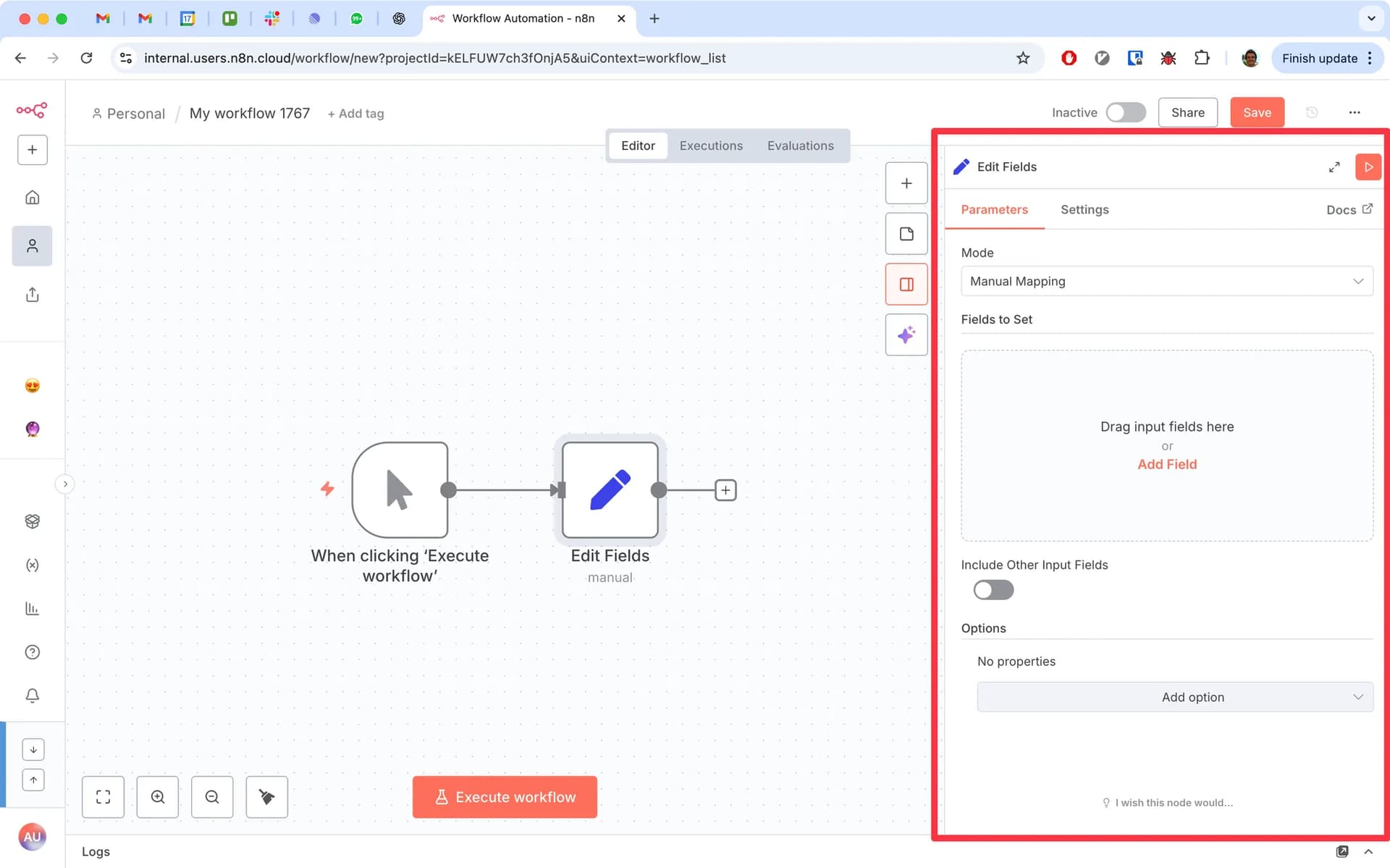
Once inside the n8n dashboard, you’ll see the workflow canvas. This is where automations are visually built.
Key UI elements:
Canvas: Workspace where workflows are created
Node Palette: List of available integrations and tools
Connections: Lines connecting nodes to define workflow logic
Each node represents an action, trigger, or data operation.
Example node types:
Trigger nodes (Webhook, RSS Feed, Schedule)
Data nodes (Set, Function, Code)
Integration nodes (Slack, Gmail, Notion)
Step 3: Building a Practical Multi-Step Workflow
Example: RSS Feed → Slack Notification
This workflow will:
Detect new articles from an RSS feed
Format the article data
Send the update to a Slack channel
Trigger Node Configuration (RSS Feed)
Add an RSS Feed Trigger node to monitor new posts.
Configuration example:
Feed URL: https://example.com/rss
Polling interval: 5–10 minutes
The node outputs structured JSON data like:
{
"title": "New Article Published",
"link": "https://example.com/article",
"author": "John Doe",
"pubDate": "2026-03-07"
}
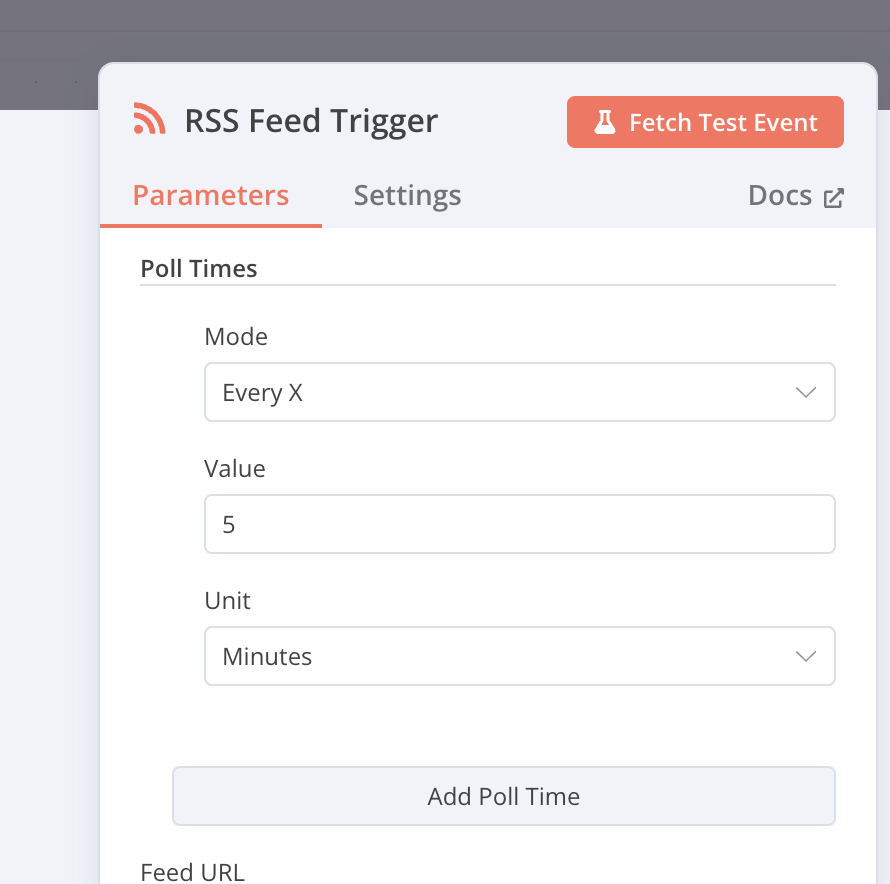
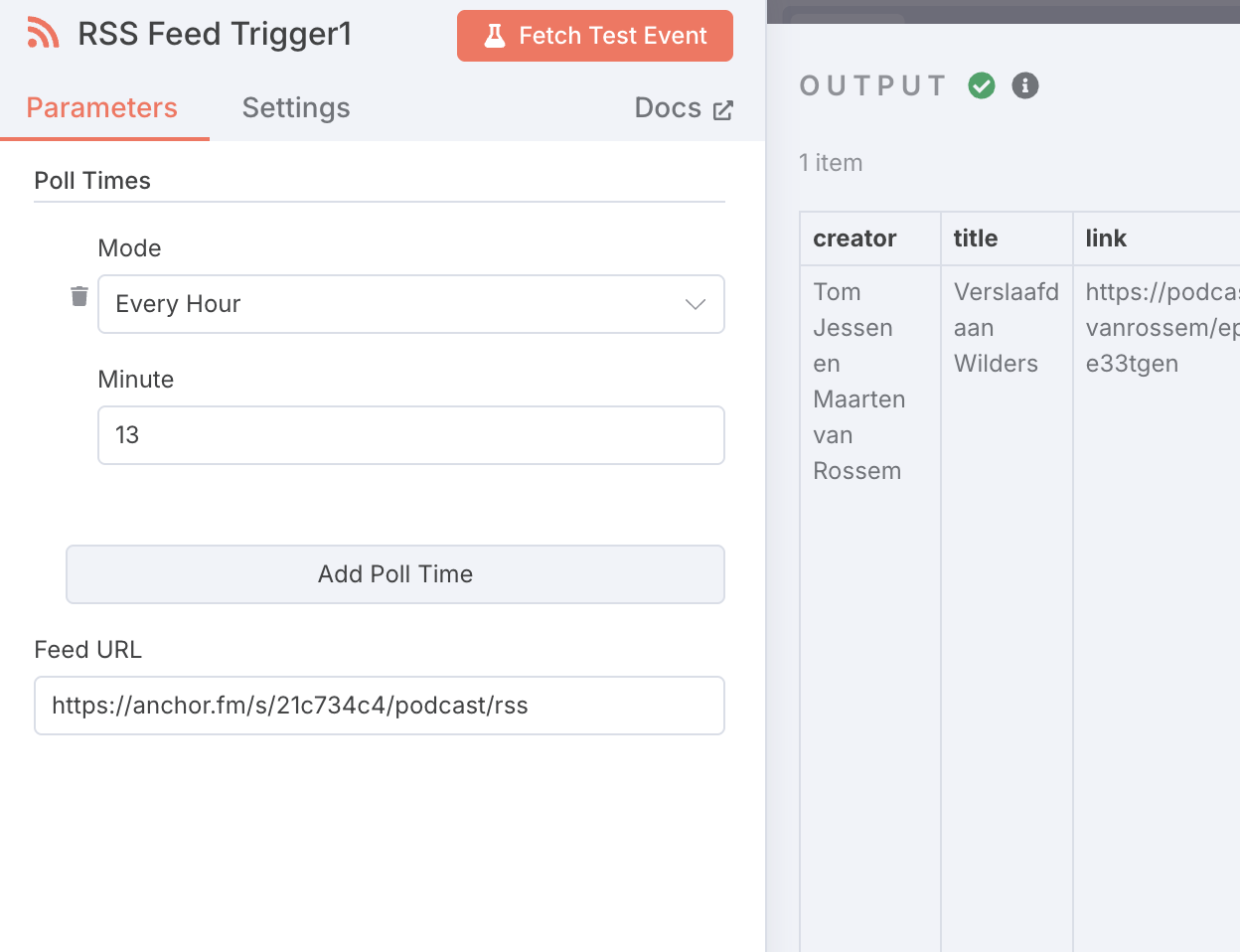
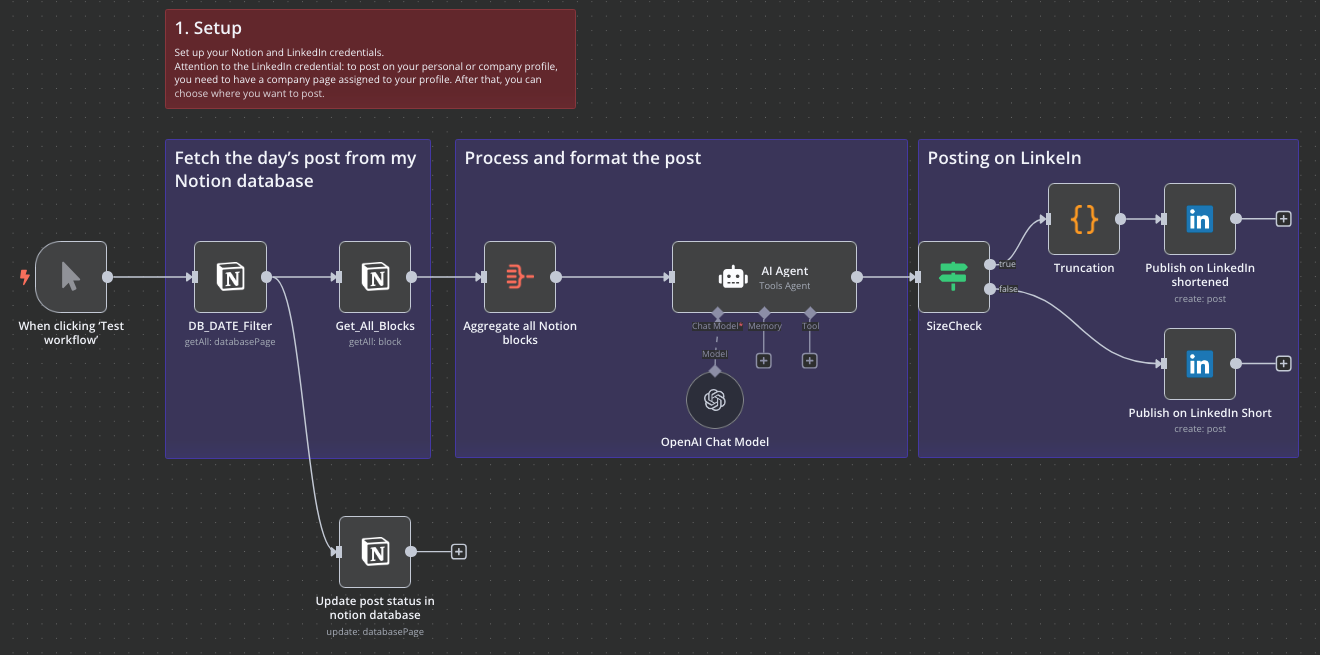
This node triggers the workflow every time a new RSS item appears.
Data Transformation (Set Node or Function Node)
Next, add a Set Node or Function Node to format the message.
Example using a Function Node:
return [{
title: $json["title"],
message: `New article published: ${$json["title"]}
Read here: ${$json["link"]}`
}]
This transforms raw RSS data into a clean message format for Slack.
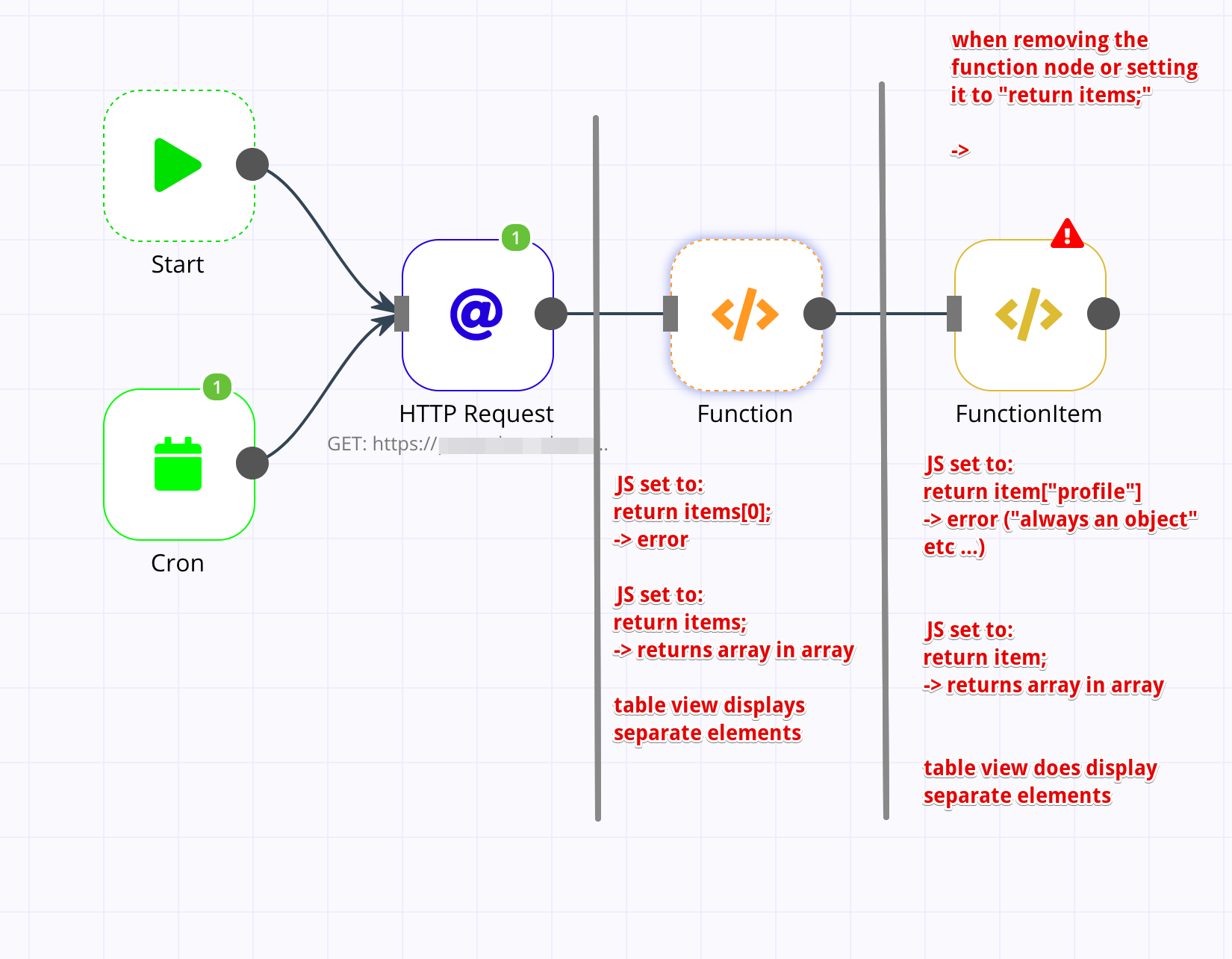
This step demonstrates how n8n can manipulate JSON data before sending it to another service.
Action Node Configuration (Slack Message)
Add a Slack node to send the formatted message.
Typical configuration:
Operation: Send Message
Channel: #news-updates
Text Field:
{{$json["message"]}}
This dynamically inserts the formatted message from the previous node.
Testing and Activation
Before activating the workflow:
Click Execute Workflow
Confirm the RSS node retrieves data
Verify the Slack message appears in your channel
Once verified, click Activate Workflow.
From this point forward, n8n will automatically monitor the feed and send updates.
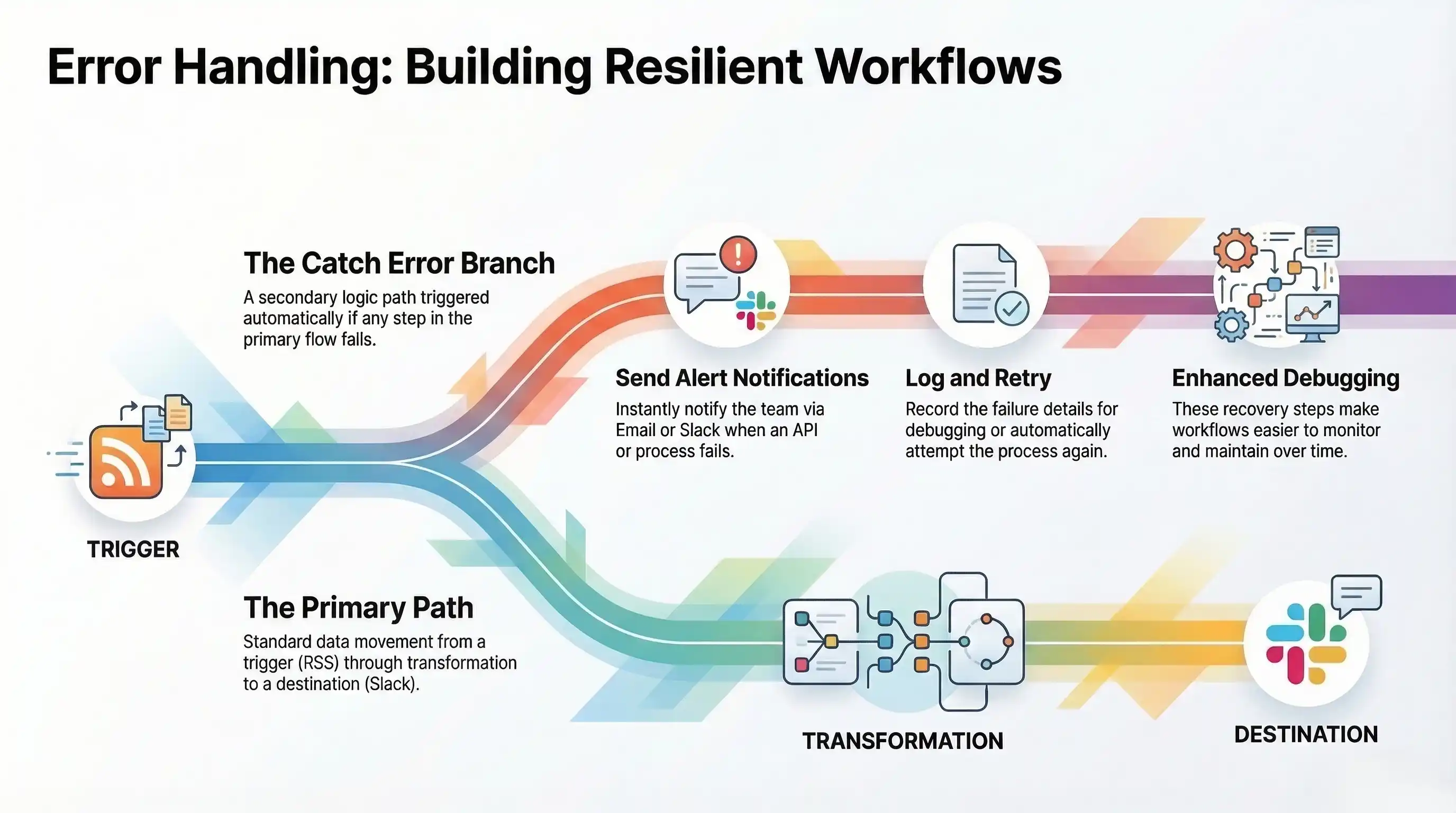
Step 4: Implementing Basic Error Handling
Reliable automation requires error management.
Add a Catch Error node to the workflow.
Example flow:
RSS Trigger → Data Transform → Slack Message
↓
Catch Error
↓
Send Alert (Email/Slack)
If Slack fails or the API request returns an error, the workflow can:
Send an alert notification
Log the failure
Retry the process
This ensures workflows remain resilient and easier to debug.
n8n Pricing Explained: Self-Hosted vs. Cloud & Hidden Costs
Understanding n8n's Dual Offering: Self-Hosted vs. Cloud
n8n offers two primary deployment options:
Self-Hosted (Open Source) – Run n8n on your own infrastructure.
n8n Cloud – A fully managed service maintained by the n8n team.
Many teams struggle to understand the true total cost of ownership (TCO). While self-hosting appears free, infrastructure, maintenance, and developer time can introduce hidden costs. Cloud plans simplify operations but involve recurring subscription fees.
To decide which model fits best, consider the control vs. convenience trade-off.
Self-Hosted (Open Source): The “Free” Option with Considerations
The core n8n software is open-source and free to use, but running it in production requires infrastructure and operational management.
Typical deployment methods include:
Docker (most common production setup)
npm installation
Cloud infrastructure platforms such as AWS, DigitalOcean, Vultr, or Heroku
However, several costs should be considered.
Infrastructure Costs
Self-hosted deployments require:
Virtual servers or containers
Databases (PostgreSQL recommended)
Storage and backups
Operational Maintenance
Teams must handle:
Version updates
Workflow monitoring
Server scaling
Security management
This introduces a common challenge: developer time spent maintaining the automation system instead of building workflows.
Self-hosting works best when organizations need maximum control, custom integrations, and strict data privacy.
n8n Cloud: Managed Service Tiers
n8n Cloud removes infrastructure management by providing a fully hosted automation environment.
Instead of server resources, pricing is primarily based on executions and workflow limits.
Key Concepts
Executions – Each time a workflow runs, it counts as an execution.
Active Workflows – The number of workflows currently enabled and running.
Cloud plans generally include:
Starter
Ideal for individuals or small teams
Limited executions and workflows
Managed infrastructure with minimal setup
Pro
Higher execution limits
More active workflows
Priority support and advanced usage capabilities
Enterprise
Custom execution limits
Dedicated support and SLAs
Advanced security and infrastructure agreements
Navigating Potential Hidden Costs
Regardless of deployment method, several indirect costs can impact automation budgets.
Developer Time
Building complex workflows or troubleshooting integrations may require developer resources.
External Services
Many workflows rely on third-party services such as:
APIs
SaaS platforms
Databases
These services often have separate pricing models.
Scaling Infrastructure (Self-Hosted)
As automation volume increases, self-hosted deployments may require:
Larger servers
Load balancing
Database optimization
Unexpected scaling needs can increase infrastructure costs.
Understanding these factors helps organizations accurately estimate the long-term cost of automation.
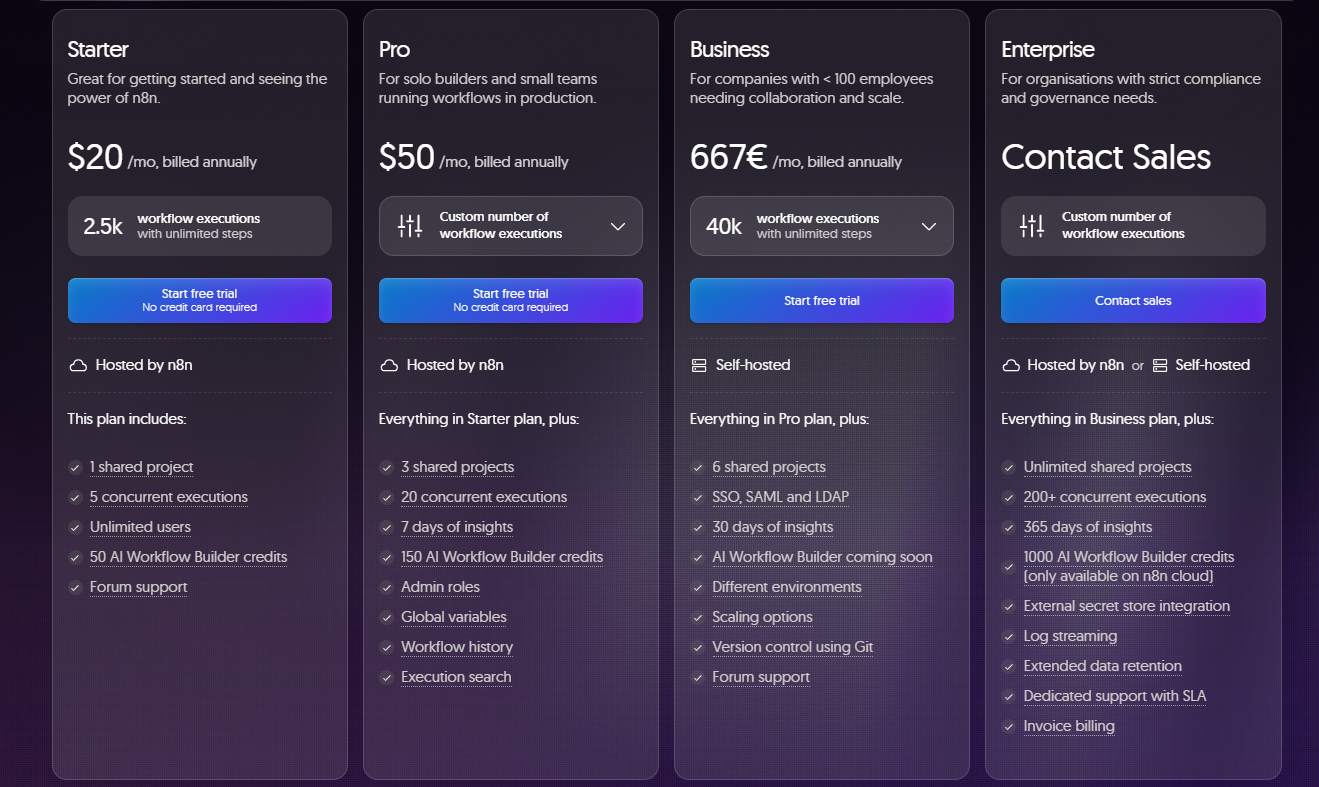
Self-Hosted vs. Cloud: Which n8n Is Right for You?
Note: Pricing limits, execution quotas, and features may change. Always verify details from the official n8n website before making deployment decisions.
n8n vs. The Competition: A Head-to-Head Comparison
Understanding the Automation Landscape
Automation platforms generally fall into three categories:
No-Code Tools
Designed for non-technical users. Workflows are simple trigger → action automations. Example: Zapier.
Low-Code Platforms
Offer visual builders but allow more complex logic and data handling. Example: Make.com.
Developer-Centric Tools
Provide deep customization through code and APIs. Example: Pipedream.
n8n sits uniquely between low-code and developer automation. It combines a visual workflow builder with full coding flexibility, making it suitable for both technical teams and advanced automation users.
n8n's Unique Positioning
n8n stands out because of its Hybrid Advantage:
Open-source and self-hostable
Managed cloud option
Full developer customization
This flexibility allows teams to future-proof their automation infrastructure. Unlike closed SaaS tools, workflows built in n8n remain portable and under user control, reducing vendor lock-in risks.
Another major differentiator is the community-driven ecosystem. Developers actively contribute nodes, integrations, and improvements, which continually expands the platform's capabilities.
n8n vs Zapier
Zapier is one of the most popular automation tools, particularly for non-technical users.
Strengths of Zapier
Extremely easy to use
Large integration marketplace
Quick setup for simple automations
Limitations Compared to n8n
Pricing is based on tasks, which can become expensive at scale
Limited customization for advanced workflows
Fully cloud-hosted, meaning no self-hosting or infrastructure control
Where n8n Wins
Self-hosting capability
Advanced workflow logic
Lower long-term costs for high-volume automations
n8n vs Make.com (Integromat)
Make.com offers a powerful visual automation builder with advanced workflow scenarios.
Strengths of Make
Intuitive visual workflow editor
Strong data transformation tools
Flexible scenario-based automation
Limitations Compared to n8n
Fully SaaS-based platform
Pricing based on operations and data usage
Less control over infrastructure and data hosting
Where n8n Wins
Open-source deployment options
Custom node development
Greater extensibility for developers
n8n vs Pipedream
Pipedream is designed primarily for developers who want to build serverless automations using code.
Strengths of Pipedream
Powerful developer-focused platform
Supports multiple programming languages
Serverless execution environment
Limitations Compared to n8n
Requires more coding knowledge
Less visual workflow orientation
Primarily cloud-based
Where n8n Wins
Hybrid visual + code workflow builder
Easier onboarding for teams
Self-hosting support
Platform Comparison Overview
Getting Started with n8n: A Quick-Start Guide
Choosing Your Path: Self-Hosted vs. Cloud
Before installing n8n, decide how you want to run it. The right option depends on your technical experience, budget, and data requirements.
Consider these factors:
Technical Expertise: Do you manage servers and containers?
Budget: Do you prefer free infrastructure-based deployment or a managed subscription?
Scalability Needs: Will workflows scale quickly?
Data Sensitivity: Do you need full control over where your data lives?
Quick Decision Checklist
Question
Recommended Option
Need full data control and customization?
Self-Hosted
Want the fastest setup with minimal maintenance?
n8n Cloud
Comfortable managing servers and updates?
Self-Hosted
Prefer a fully managed automation platform?
n8n Cloud
Option 1: Self-Hosting n8n
Self-hosting gives you complete control over infrastructure, data, and workflow customization.
Prerequisites
Before installation, ensure you have:
Docker & Docker Compose (recommended production method)
Node.js and npm (for CLI installation)
A Linux server or cloud instance
Installation Methods
Docker (Recommended)
Docker is the easiest and most reliable way to run n8n.
Example Docker Compose configuration:
version: "3"
services:
n8n:
image: n8nio/n8n
ports:
- "5678:5678"
environment:
- N8N_BASIC_AUTH_ACTIVE=true
- N8N_BASIC_AUTH_USER=admin
- N8N_BASIC_AUTH_PASSWORD=password
volumes:
- ~/.n8n:/home/node/.n8n
This configuration launches n8n and exposes the interface on:
Docker simplifies:
deployment
updates
container scaling
npm Installation (Advanced Users)
Developers can also install n8n globally using npm.
npm install n8n -g
n8n start
This method is commonly used for development environments.
Cloud Server Deployment
Many teams run self-hosted n8n on cloud infrastructure such as:
AWS
DigitalOcean
Vultr
Heroku
These platforms provide scalable servers while maintaining full control over the automation environment.
Initial Configuration & Access
Once installed:
Open your browser
Navigate to your server address
Access the n8n workflow editor UI
Sensitive information such as API keys should be stored using environment variables.
Expert Tip:
Use environment variables to manage credentials securely instead of storing them directly inside workflows.
Option 2: Signing Up for n8n Cloud
For users who prefer a managed solution, n8n Cloud removes the need for server management.
Getting started is simple:
Create an account on the n8n website
Choose a subscription plan
Access the automation interface immediately
With n8n Cloud:
infrastructure is managed automatically
updates are handled by the platform
workflows scale based on your subscription plan
This option is ideal for teams that want automation without infrastructure maintenance.
Pros and Cons of Using n8n
Advantages of n8n
Flexibility & Customization
n8n provides unmatched flexibility through:
code nodes
HTTP request nodes
custom integrations
self-hosted deployment
This directly solves a common problem with automation tools: limited customization options.
Cost-Effectiveness
Many automation platforms become expensive as workflow volume grows.
n8n offers:
free self-hosted deployment
competitive cloud pricing
This makes it attractive for startups, developers, and growing businesses.
Data Control & Privacy
Self-hosting allows organizations to fully control their automation infrastructure and data.
This helps address concerns related to:
vendor lock-in
data ownership
compliance requirements
Extensibility
n8n can integrate with virtually any service that exposes an API.
Developers can extend functionality through:
custom nodes
REST API integrations
JavaScript automation logic
Community Support
Because n8n is open-source, it benefits from a strong developer community.
Users gain access to:
GitHub contributions
community nodes
shared workflow templates
forums and documentation
This community-driven ecosystem continuously expands the platform's capabilities.
Powerful Data Orchestration
n8n is more than a simple automation tool. It can function as a data orchestration engine, handling complex data pipelines and integration workflows across multiple systems.
Disadvantages of n8n
Learning Curve
Compared to pure no-code tools, n8n requires a moderate learning curve, especially for advanced workflows.
Expert Tip:
Start with simple workflows and gradually build more complex automation pipelines.
Self-Hosting Overhead
Running n8n yourself requires:
server maintenance
software updates
infrastructure management
This can be challenging for non-technical users.
Initial Setup Complexity
Self-hosted installations may require configuration of:
databases
environment variables
authentication systems
Cloud deployment removes most of this complexity.
Troubleshooting Complexity
Advanced workflows involving APIs or custom code may require technical debugging.
Expert Tip:
Leverage the n8n documentation and community forums when troubleshooting complex integrations.
Performance & Scalability (Self-Hosted)
Large-scale automation workloads require:
proper server configuration
monitoring tools
scaling strategies
Without proper infrastructure planning, performance issues may occur.
Advanced Best Practices & Workflow Optimization
Designing for Resilience & Maintainability
Reliable automation requires workflows that are easy to maintain and resilient to failures.
Implement Robust Error Handling
Always design workflows with fallback paths. Use nodes like:
Error Trigger / Catch Error
Conditional branches for failed API responses
Retry logic for temporary service outages
Example pattern:
Webhook → Process Data → Send API Request
↓
Catch Error → Send Alert
This prevents silent failures and ensures workflows remain stable in production environments.
Use Modular Workflow Design
Instead of creating one massive workflow, break processes into smaller modules.
Example structure:
Workflow A → Data Collection
Workflow B → Data Processing
Workflow C → Notifications
Modular workflows improve debugging, reusability, and scalability.
Version Control Your Workflows
For self-hosted deployments, consider exporting workflows to Git repositories. This enables:
version tracking
rollback capability
collaborative workflow development
Expert Tip:
Regularly backup your workflows and configuration files to avoid losing critical automation logic.
Performance & Resource Management
As automation grows, workflow efficiency becomes critical.
Monitor Executions & Resource Usage
For self-hosted instances, monitor:
workflow execution frequency
server CPU and memory usage
database performance
This helps detect automation bottlenecks early.
Optimize Node Operations
Performance improvements can come from:
minimizing unnecessary nodes
filtering data earlier in the workflow
batching API requests when possible
Efficient workflows reduce execution time and infrastructure load.
Security & Credential Management
Automation often involves sensitive credentials such as API keys and database connections.
Use Environment Variables
Sensitive values should be stored using environment variables, not hardcoded inside workflows.
Benefits include:
better credential security
easier configuration across environments
safer infrastructure management
Access Control & User Management
In team environments, configure:
role-based access permissions
secure credential storage
workflow ownership policies
These practices prevent unauthorized access and protect automation infrastructure.
Leveraging the n8n Community & Documentation
One of n8n’s biggest advantages is its active open-source ecosystem.
Useful resources include:
Official documentation
GitHub repository
Community forum
Shared workflow templates
These resources help users:
troubleshoot integrations
discover new automation ideas
learn advanced workflow patterns
Expert Tip:
When solving complex automation challenges, search community discussions first many advanced use cases have already been shared by other developers.
Developers can also contribute to the ecosystem by:
building community nodes
improving documentation
sharing workflow templates
This collaborative model strengthens the platform’s capabilities.
Conclusion: The Future of Automation with n8n
Automation is rapidly becoming essential for modern businesses, developers, and technical teams. However, many traditional automation tools introduce high costs, vendor lock-in, and limited customization.
n8n addresses these challenges by offering a platform built around flexibility, control, and extensibility.
Key strengths include:
Open-source architecture
Self-hosted and cloud deployment options
Deep workflow customization
Cost-efficient automation at scale
Powerful API and data orchestration capabilities
Because of its open-source foundation, n8n also helps future-proof automation infrastructure. Organizations maintain control over their workflows, integrations, and data something closed SaaS tools rarely provide.
As automation demands grow, businesses increasingly require solutions that are:
customizable
scalable
secure
developer-friendly
n8n is well positioned to meet this demand.
If you're exploring automation for your projects or organization, the best way to understand n8n is to try it yourself.
Start by:
creating an n8n Cloud account, or
deploying your own self-hosted instance
From there, you can experiment with workflows, explore integrations, and join the growing community of developers and automation professionals building powerful systems with n8n.
By combining open-source innovation with practical automation capabilities, n8n represents a major step forward in the future of workflow automation.
You have not enough Humanizer words left. Upgrade your Surfer plan.
